
Help & Guides
Everything you need to watch Liga A1 Semi-Pro 2026/2027 live — buying a ticket, watching the stream, casting to your TV, and fixing common problems.
How to Buy a PPV Ticket
- 1Find the match you want on the homepage or the Matches page. A match with PPV shows a red "Buy PPV" button.
- 2Tap "Buy PPV". The official ticket form opens.
- 3Fill in your name, e-mail address, and WhatsApp number. Your ticket is delivered to your WhatsApp — use a number you can open on match day.
- 4Pay RM10 with FPX online banking, a debit/credit card, or an e-wallet.
- 5Check your WhatsApp — the ticket arrives automatically, usually within seconds. Tap the access button in the message. A copy also goes to your e-mail.
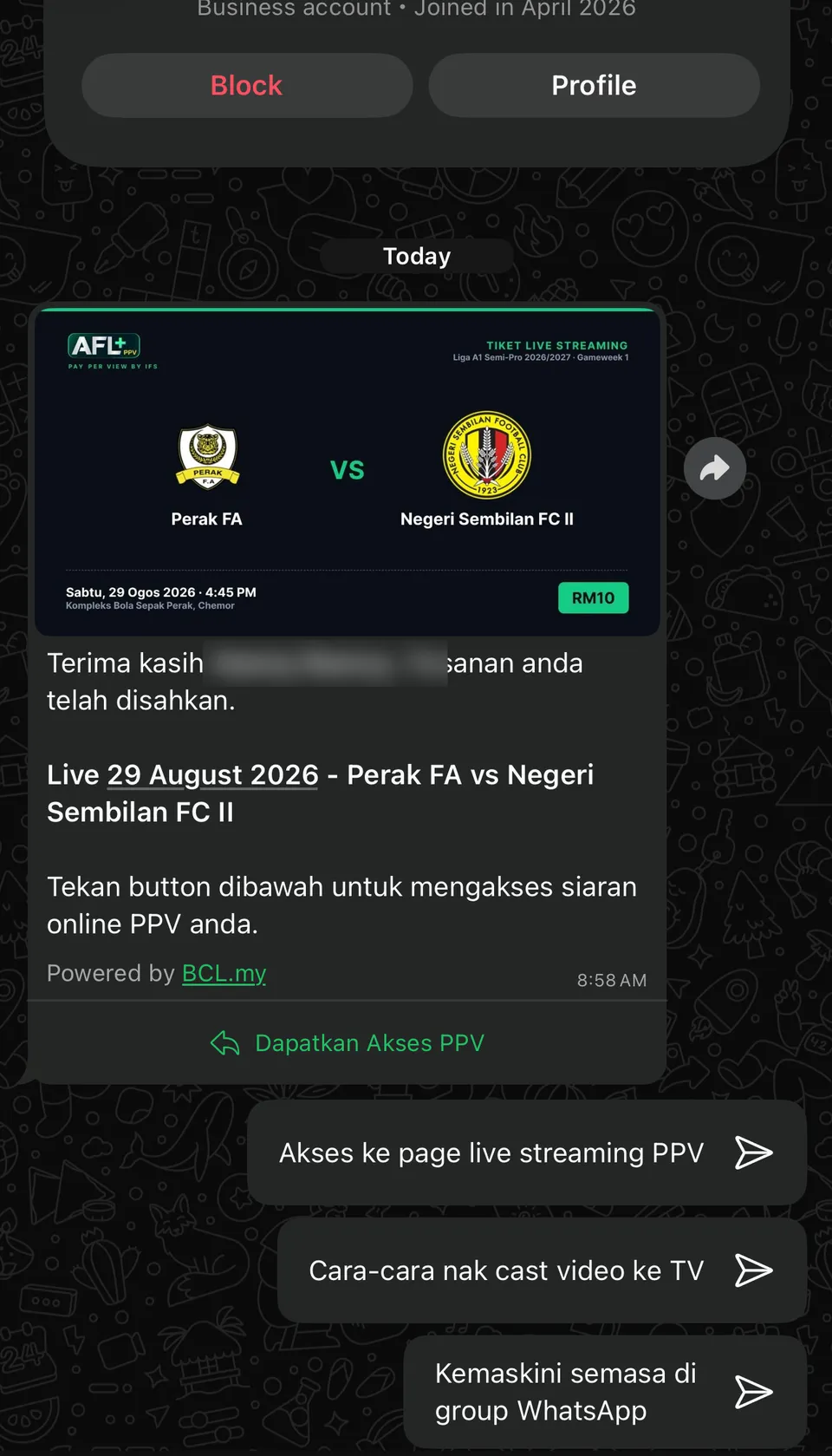
The WhatsApp confirmation with your ticket — tap "Dapatkan Akses PPV"
How to Watch Your Stream
- 1After payment, an access tutorial arrives on your WhatsApp and your access link also goes to your e-mail. Open the access link.
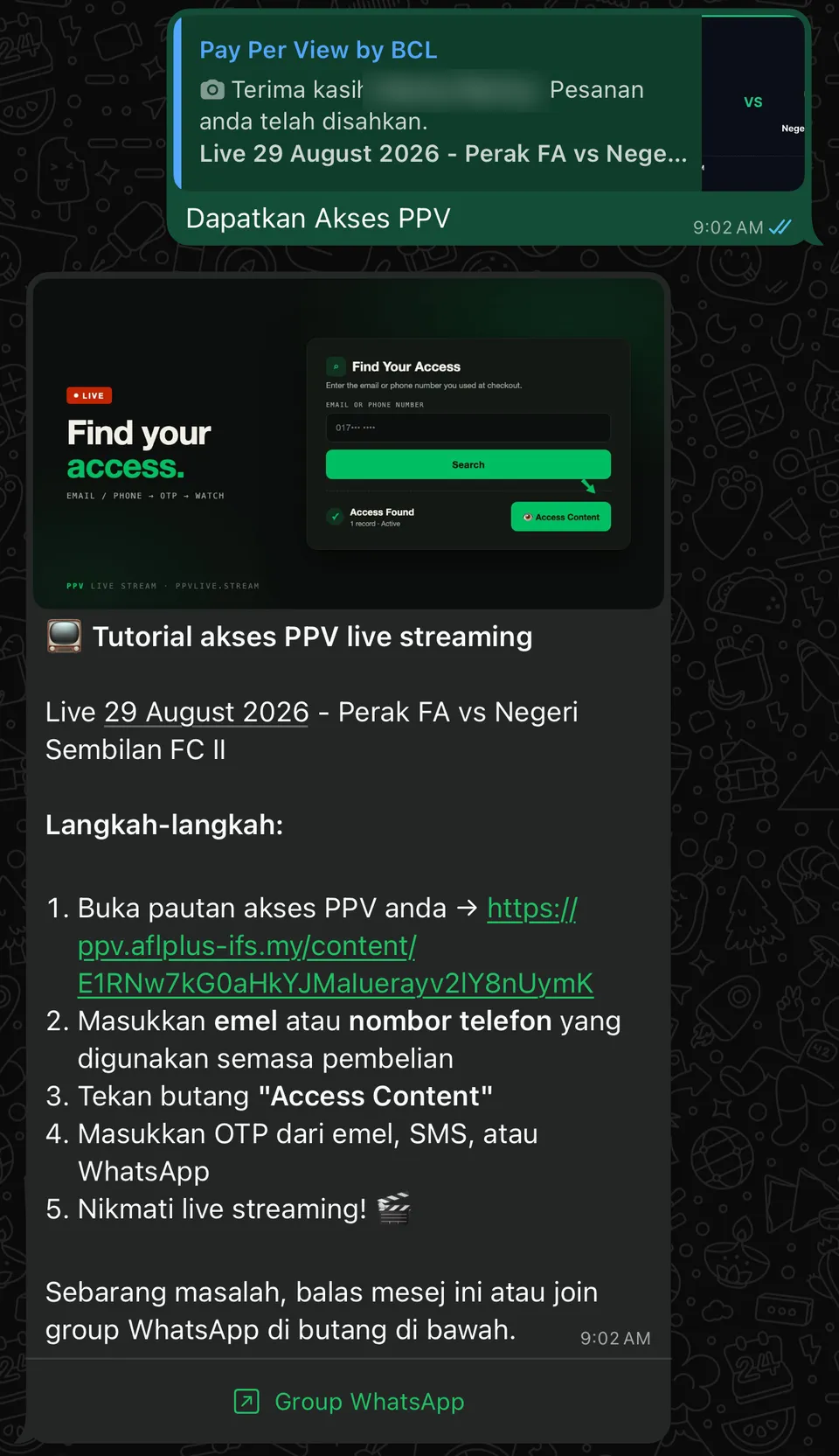
The access tutorial arrives on WhatsApp with your personal link - 2Enter the e-mail address or phone number you used when you bought the ticket.
- 3Tap "Access Content". A one-time code (OTP) is sent to you by e-mail, SMS, or WhatsApp.
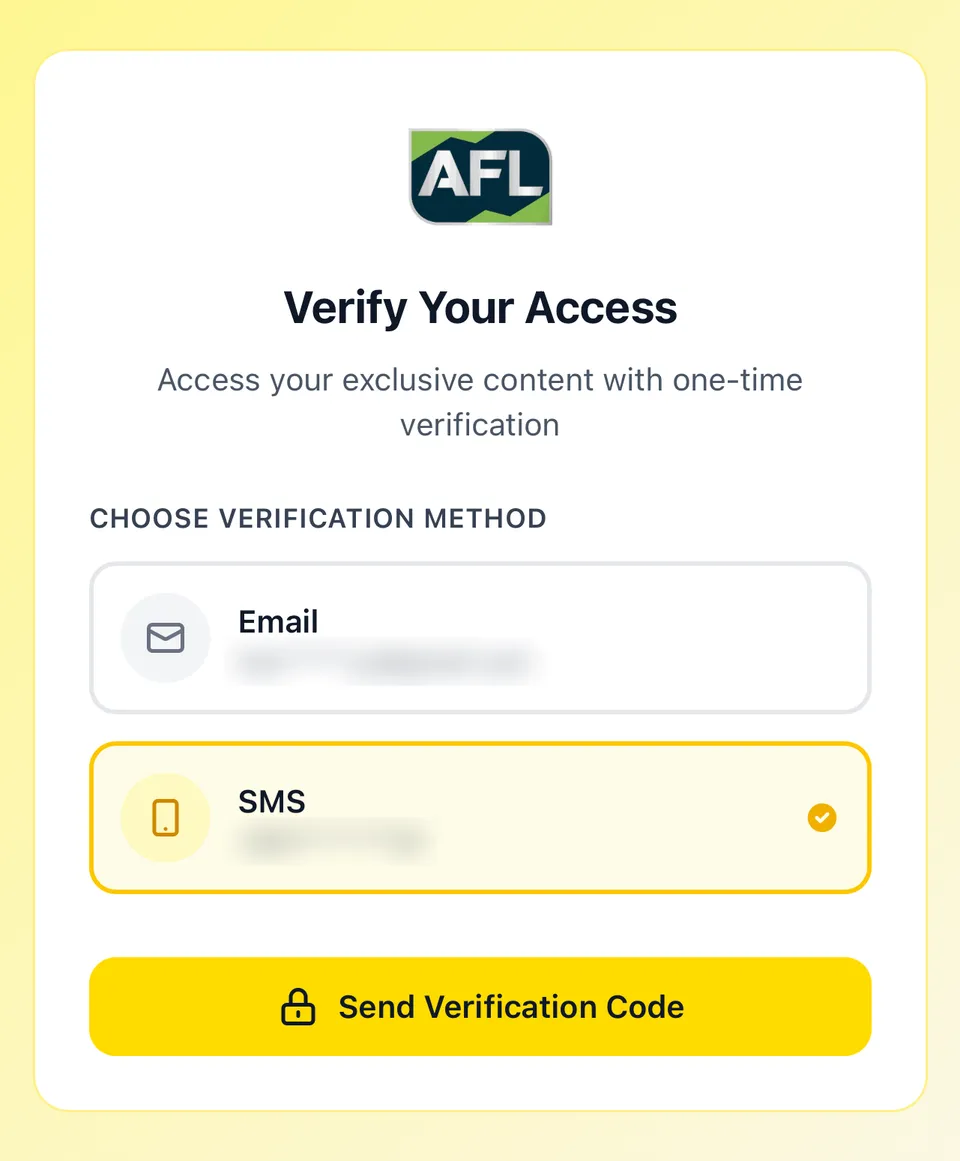
The verification page — choose e-mail or SMS for your OTP - 4Enter the OTP. The stream page opens.
- 5The stream goes live at kickoff. Arrive a few minutes early. Any problem? Reply to the WhatsApp message — support answers there.WhatsApp Support
How to Cast to Your TV
The stream page has a built-in "Watch on TV" feature. It works from any phone or browser — including iPhone — with no app install. This is the only supported casting method.
- 1Open the YouTube app on your Smart TV. It works on any Smart TV — Samsung, LG, Android TV, Fire TV, Mi Box.
- 2Go to Settings on the left sidebar. Use your TV remote to scroll to the bottom of the left menu.
- 3Select "Link with TV code". A 12-digit number appears on your TV screen.
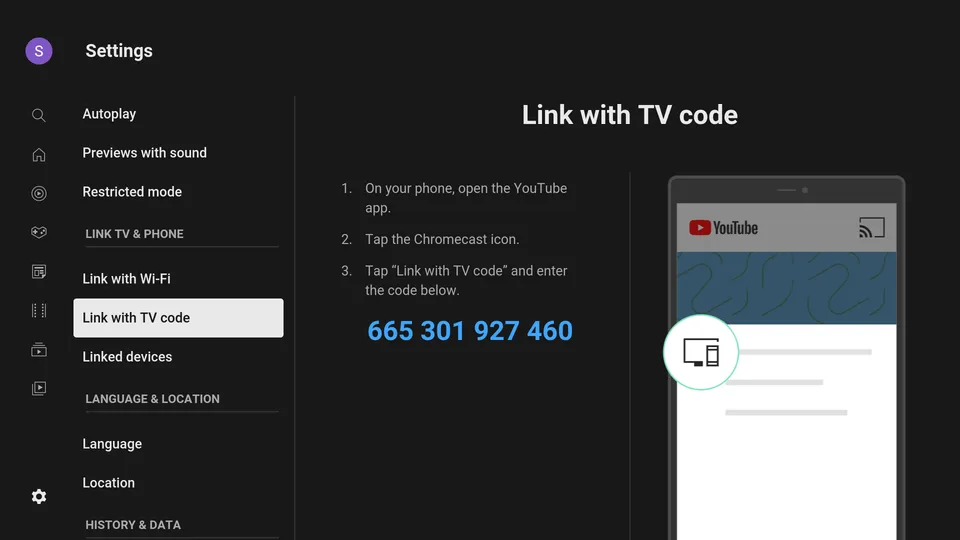
What it looks like on your TV - 4On your stream page, type the 12-digit code into the "Watch on TV" box and tap Connect. The video starts playing on your TV automatically.
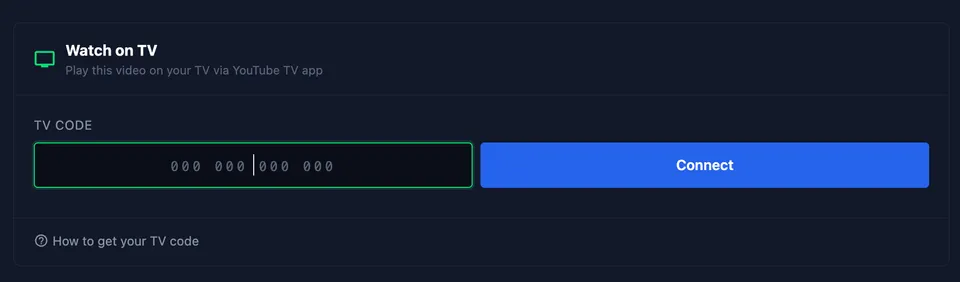
The "Watch on TV" box on your stream page
Payment Methods
All payments are processed securely by Bayarcash, a registered payment gateway. No app to download, no account to register. You can pay with:
- 1FPX online banking — all major Malaysian banks.
- 2DuitNow QR — scan and pay from any supported bank or e-wallet app.
- 3Debit or credit card — Visa and Mastercard.
- 4E-wallets — as listed on the payment page.
Troubleshooting
No confirmation message
- 1.Check WhatsApp on the phone number you entered at purchase.
- 2.Check the e-mail copy too, including the spam folder.
- 3.Still nothing after 15 minutes? Reply to any AFL+ WhatsApp message, or contact support with your payment reference.
OTP does not arrive
- 1.Confirm you entered the same e-mail or phone you used at purchase.
- 2.Wait one minute, then request the code again.
- 3.Check your phone signal or e-mail spam folder.
Wrong phone number at purchase
- 1.Contact support on WhatsApp with your order number.
- 2.We resend your ticket to the correct number.
How many devices per ticket?
- 1.One ticket streams on one device at a time — like one ticket for one person at the stadium gate.
How much internet data?
- 1.A full match uses roughly 1GB to 2GB at normal quality. Wi-Fi is recommended when available.
Stream keeps buffering
- 1.Move closer to your Wi-Fi router, or switch to a stronger network.
- 2.Close other apps and downloads that use the connection.
- 3.Refresh the stream page.
WhatsApp Quick Commands
The AFL+ WhatsApp line answers instantly to typed commands. No waiting for an operator.
- 1Open your chat with the AFL+ WhatsApp line — use the WhatsApp Support button below if you have no message yet.WhatsApp Support
- 2Type "/" in the message box. The command menu appears.
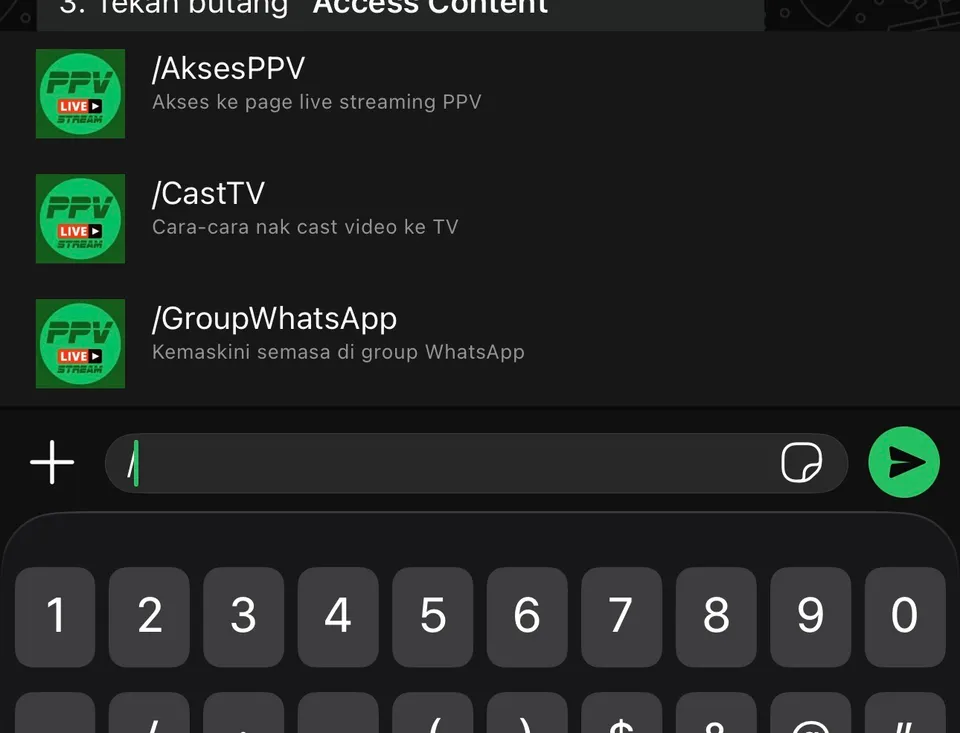
Type "/" and the commands appear - 3Pick a command: /AksesPPV opens your stream access page, /CastTV sends the cast-to-TV guide, /GroupWhatsApp joins the buyers group for live match-day updates.
Refund Policy
All PPV sales are final once your access link is issued. If a technical failure on our side stops you from watching, contact support during the match and we will assist you.
Still stuck?
Our team answers fastest on WhatsApp during match hours.
WhatsApp Support Join Buyers Group